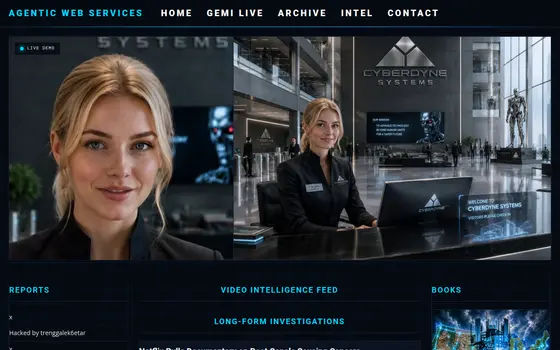
Agentic Web Services
Agentic super-agent hero scene, black and goldAgentic super-agent heroes, cinematic black and goldThe Agentic Web Services super agentsAgentic Web Services super-car in black and goldGold cutaway of the agent engine

Super Intelligence.

The mega-suite of super-agent services — call centers, websites, ordering, security and tech support — from one super-intelligent provider.

We make advanced technology simple to use — at a price Main Street can say yes to.

What makes them super

What makes our super agents super-duper

Not a chatbot. A persistent, self-aware super agent that runs your digital work on long missions — and now, with our new auto-ledger assistant, it holds the mission together turn after turn without losing the thread.

Our new auto-ledger assistant

A judge-and-remind co-pilot that rides every mission — it keeps the agent honest about what’s done versus still open and never lets a task quietly disappear. It’s how our agents carry a long job for hours, unattended, and still finish it.

Persistent & self-aware

Always on, always remembers. It runs in a persistent, self-aware way — picking up exactly where it left off instead of starting over every time.

Long missions, extreme workloads

Send it off and come back to real progress. Websites, books, stores, videos, automation — whole workloads handled start to finish, not one question at a time.

Fully autonomous self-driving servers

“A self-driving server instead of a self-driving car.” Your box, managed and administered by super agents — they build, wire, monitor, fix and keep it running 24/7, answering only to you.

On demand, anywhere

A super agent — and a supercomputer — you command from any device, anytime, anywhere. A mega-corporation in your pocket.

Run both engines

Claude for the deep build, Atlas (Codex) for live audio and images. We run both and pick the winner for the job.

The breakthrough

The Auto-Ledger — why our agents finish what they start

Frontier models think brilliantly for a single turn. The Auto-Ledger is the control structure that lets them finish a whole mission unattended — a cheap receiving agent that sweeps the work, holds a clear to-do list, and judges progress at every turn, reminding the agent of what’s still open and going quiet when it’s done. It never lets an agent declare its own work finished. Paired with full execution permissions, it’s what turns a brilliant one-turn model into a dependable all-night worker — the world’s first inexpensive super-agent.

Sweep & clear to-do list

A receiving agent captures every goal and keeps the open list in order — nothing forgotten, nothing repeated.

Judges every turn

At each step it checks what’s actually done versus still open — and can never mark work done on the agent’s own say-so.

Extra-long missions, no babysitting

Load the work, walk away, come back to real progress. It holds a mission together for hours, unattended.

Frontier brain, cheap local judge

The expensive model does the work; a small local model (Gemma) keeps it honest for pennies — on your own box, nothing phoned home.

Every frontier model

One ledger serves them all — Anthropic Claude, OpenAI Codex, Google Gemini and Gemma alike.

Fail-safe to honest

If the judge is down it still shows the real to-do list. It degrades to honest and quiet — never to falsely finished.

Documented in a full research paper and a patent filing — we believe it’s the most significant control structure for agentic computing since the Transformers paper itself. Read the research →

Proof, not promises

Beyond a doubt — the best at what we do

We don’t ask you to take our word for it. Try the agents on this page, watch them compete live, and see real work that shipped.

Try it live, right now

The demo chats on this page are real frontier agents — not canned scripts. Ask them anything and watch them answer.

We took a real payment this week

A working online store that accepted a real credit card in a single afternoon — no developer, no code, just a sentence.

Our agents compete live

Claude, Atlas and Eve play live chess tournaments on our own servers — the same frontier engines we put to work for your business.

It runs on your own box

Private server, your data, your code — a supercomputer that answers only to you, not a rented cloud you don’t control.

Accuracy you can hear

Test the voice agent on your own menu and hear it take the order perfectly — proof beats any promise.

One provider, the whole stack

Website, phone, POS, security, media — built, wired and run by one team, not stitched from five vendors.

We make advanced technology simple to use — at an affordable price

The same frontier AI the government and the mega-corporations use, turned user-friendly and priced for Main Street. Everything the big players do with AI, made simple enough to run from your phone — for pennies on their dollar. No code, no developers, no enterprise contracts. Describe what you want in plain English; we build it.

Do everything you do on a computer — so much better, with Super Claude

Websites, online stores, blogs, documents, videos, research, automation, tech support — everything you already do on a computer, Super Claude does for you, faster and better. One worker instead of five subscriptions. Tell it like you’d tell staff; it does the work, fixes what breaks, and never pads the invoice. A self-driving supercomputer for the smart internet of today.

Got a skill? Turn it into a business.

You bring the trade — we build the business around it. The Web Factory at agentic-web-services.com turns what you do into a real company: a website that sells, an AI front desk that answers, online ordering, booking, invoicing, marketing and the phone — all built, hosted and run for you. Plumber, baker, barber, consultant: if you’ve got the skill, we’ve got the storefront, the staff, and the supercomputer behind it. Describe it, walk away, come back to a business that’s open 24/7.

The everything app that lets you do everything

One login, one agent, every job. Website, store, phone, POS, surveillance, media, automation and tech support — the work that used to take ten apps, five logins and three vendors now lives in one place and answers to one super agent. It doesn’t just advise you; it does the work. The everything app isn’t a bigger toolbox — it’s a worker that uses all the tools for you.

The Fortress — a supercomputer we deliver, like a console

You don’t build it, wire it or secure it — we deliver it ready to run, the way a game console shows up ready to play. The Fortress is your own private, hardened server with the super agents already living on it: plug it into your business and it’s online, defended and working. Your machine, your data, your box — no cloud landlord, no monthly rent on your own intelligence. We set it up, lock it down and keep it updated; you just turn it on.

The one-line pitch

The harness that bridges the server, the agent, and your device.

Command a super-agent and a supercomputer from any device, anytime, anywhere. For a local business: an executive assistant and a whole tech team that never sleeps.

The problem we solve. Missed calls = lost orders. Staff tied to the phone instead of serving customers. 15–30% commissions bleeding to delivery apps. An old website that doesn’t sell. Tech that breaks and nobody to fix it. Ask a generic AI for a website and you get a zip file — that’s where the nightmare begins.

Meet Eve — next-generation super voice agents

Not a clunky robot. Eve is a cutting-edge, natural-sounding super agent — powered by the same class of AI behind Claude and Gemini. She answers every call 24/7, takes orders and bookings, upsells, reads the order back, handles every line at once in multiple languages, and never misses one — for about 3–5 cents per minute (only while a call is live), versus a $15–20/hour phone employee.

The SAP Console · ten screens

Inside the console

Every screen of the console that runs your phones, customers, cases and payments, shown full width with notes on reading and using each one.

01

Live Wallboard

The floor at a glance
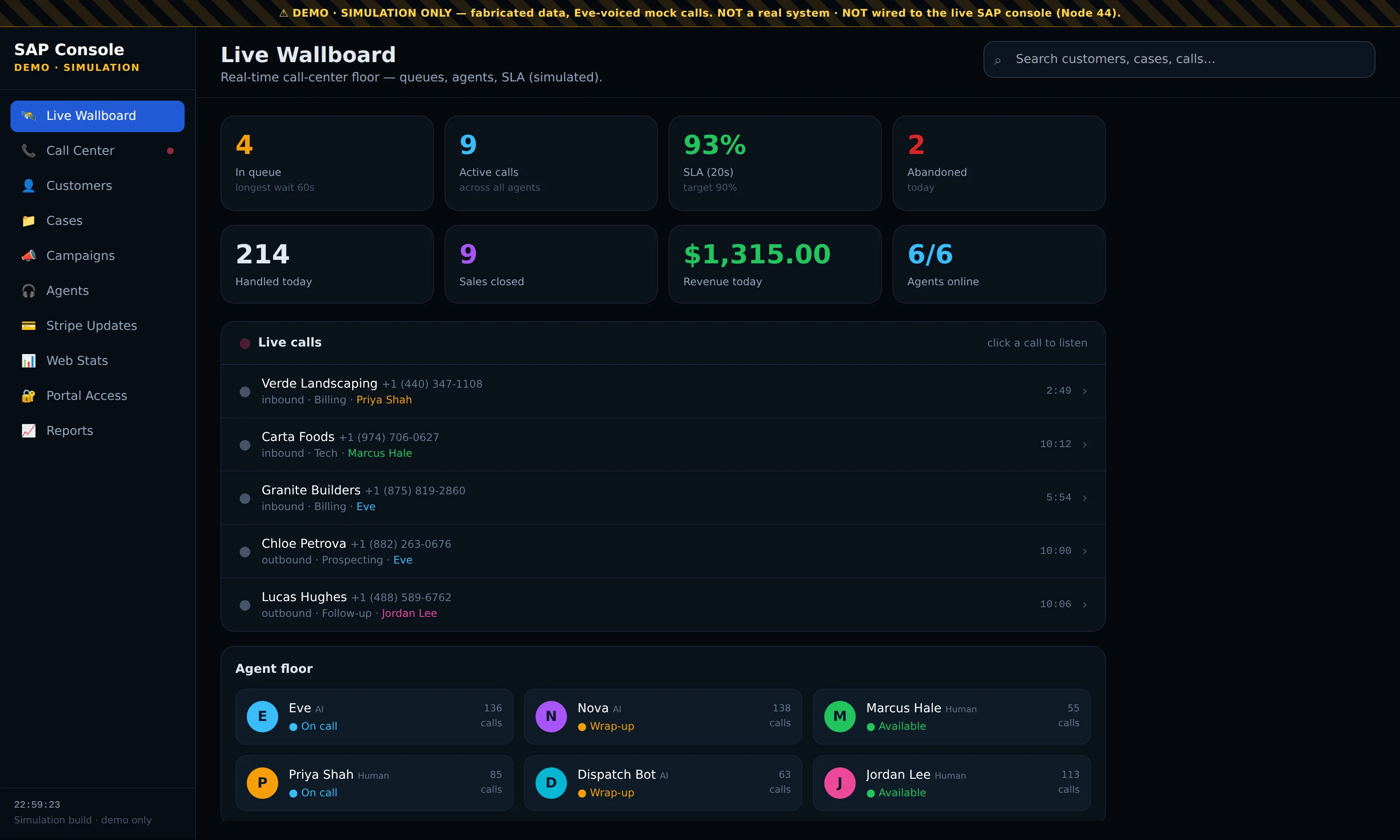
Full-width screenshot of the Live Wallboard screen in the SAP Console demo

What you are looking at

This is the home screen of the console: the whole call-center floor on one page. The top row of tiles shows what is happening right now — calls waiting in queue with the longest current wait, active calls across every agent, the service level (the share of calls answered inside 20 seconds against a 90% target), and abandoned calls for the day.

The second row is the day's scoreboard: calls handled, sales closed, revenue booked today and how many agents are online. Below it, Live calls lists every conversation in progress with the caller, number, direction, call type, the agent on the line and a running timer. The Agent floor at the bottom shows each agent — Eve and the other AI agents next to the human staff — with their status (on call, wrap-up, available) and calls taken.

How to use it

  1. Leave the wallboard open on a screen in the office, or keep it as your first tab: every tile updates as calls come in and end.
  2. Watch the queue and SLA tiles together. If the queue climbs and SLA drops under target, more callers are waiting than your agents can answer, so put another agent on the phones.
  3. Click any row under Live calls to open that conversation and listen in. The agent floor below shows at a glance who is free to take the next call.
  4. Use the search bar at the top right to jump straight to a customer, case or call from anywhere in the console.
02

Call Center

Every call, logged and replayable
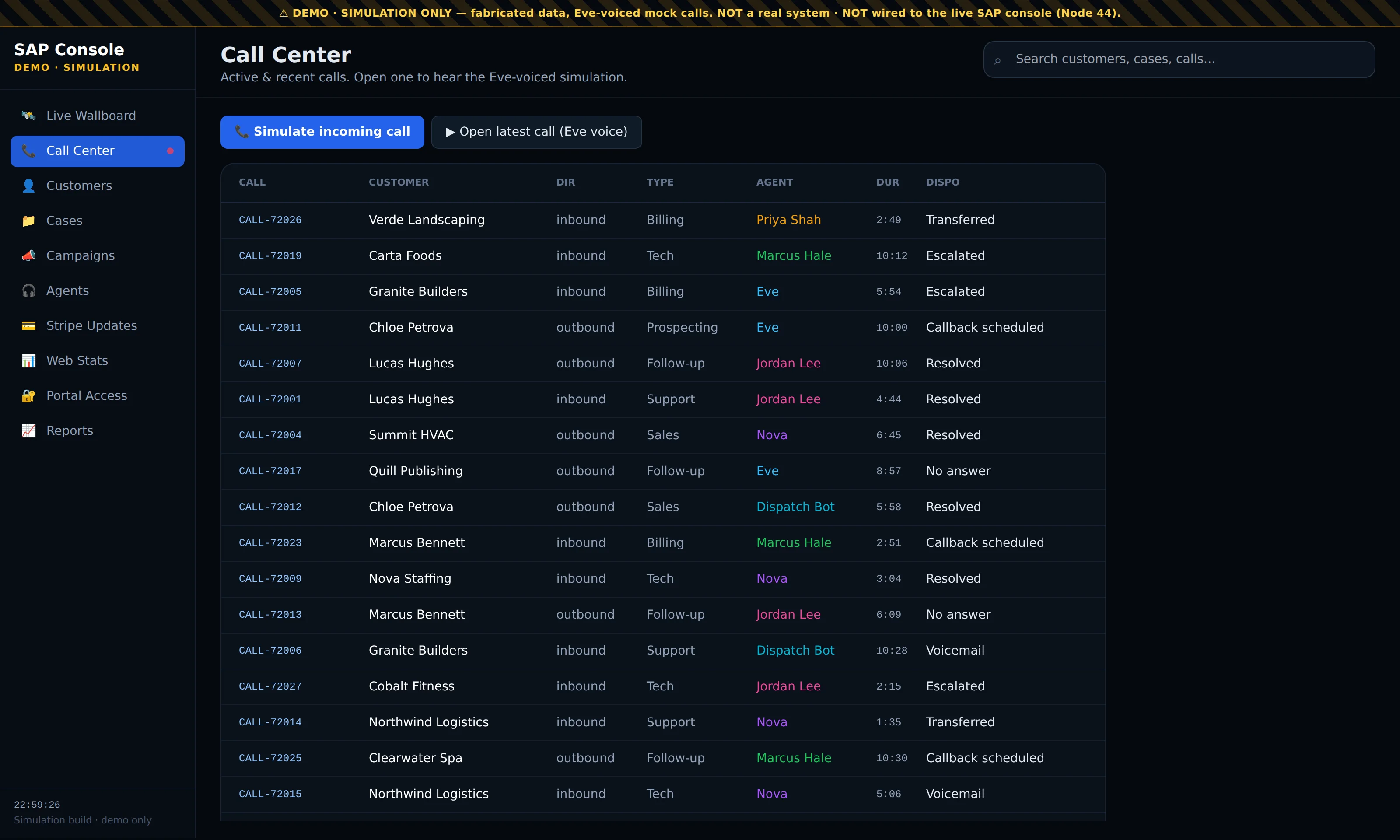
Full-width screenshot of the Call Center screen in the SAP Console demo

What you are looking at

The Call Center is the complete call log. Each row is one call with its call ID, the customer, whether it was inbound or outbound, the call type (billing, tech, support, sales, prospecting, follow-up), the agent who handled it, the duration and the disposition — how the call ended: resolved, transferred, escalated, callback scheduled, voicemail or no answer.

Calls handled by Eve sit in the same list as calls handled by people, so a manager reviews one record of the business rather than two. Agent names are colour-coded so you can scan the list and see who took what.


How to use it

  1. Click any row to open the call. The call panel shows the full details and lets you play the conversation in Eve's voice, so you hear exactly what the caller heard.
  2. Set the outcome from the panel with one click and the call's disposition updates in the log and on the wallboard.
  3. Press Simulate incoming call to watch a new call land in the log and on the wallboard, or Open latest call to jump to the most recent conversation.
  4. Scan the disposition column for Escalated and Callback scheduled each morning; those are the promises still owed to customers.
03

Customers

One record per customer
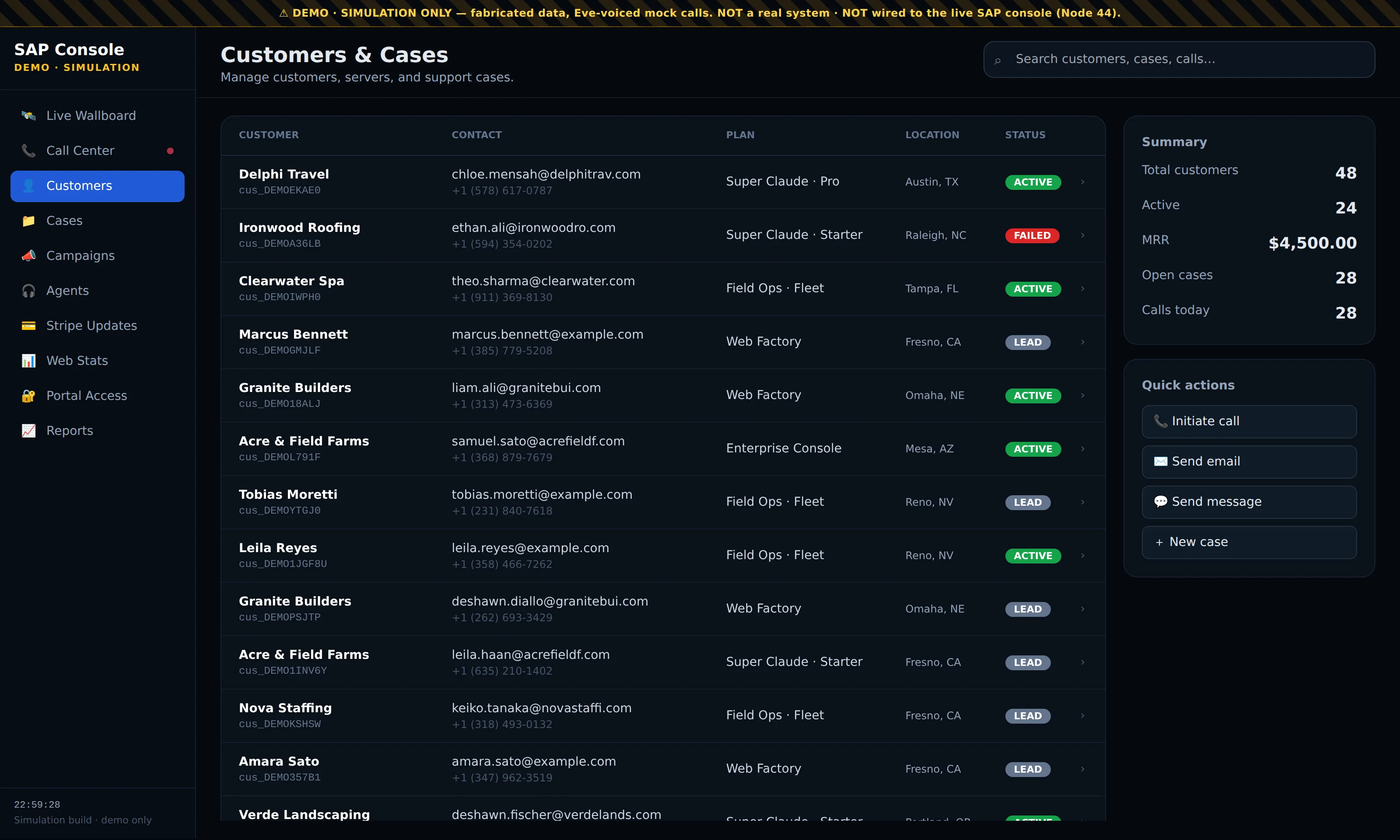
Full-width screenshot of the Customers screen in the SAP Console demo

What you are looking at

Customers is the client book. Each row shows the company, the contact with email and phone, the plan they are on, their location and an account status — active, lead, or failed when a payment did not go through.

The panel on the right summarises the book: total customers, how many are active, monthly recurring revenue, open cases and calls today. Under it are the quick actions you use most — initiate a call, send an email, send a message or open a new case.

How to use it

  1. Click a customer to open their record. It shows every call and every support case for that customer, newest first, so anyone who picks up the phone knows the history before saying hello.
  2. From the record, press Call to start a call handled in Eve's voice, or send an email or message without leaving the page.
  3. Use the status badges to work your list: Lead rows are prospects to follow up, and Failed rows are customers whose payment needs attention.
  4. Search by name, company, email or phone from the bar at the top to find a customer in a large book.
04

Cases

Support tickets with full history
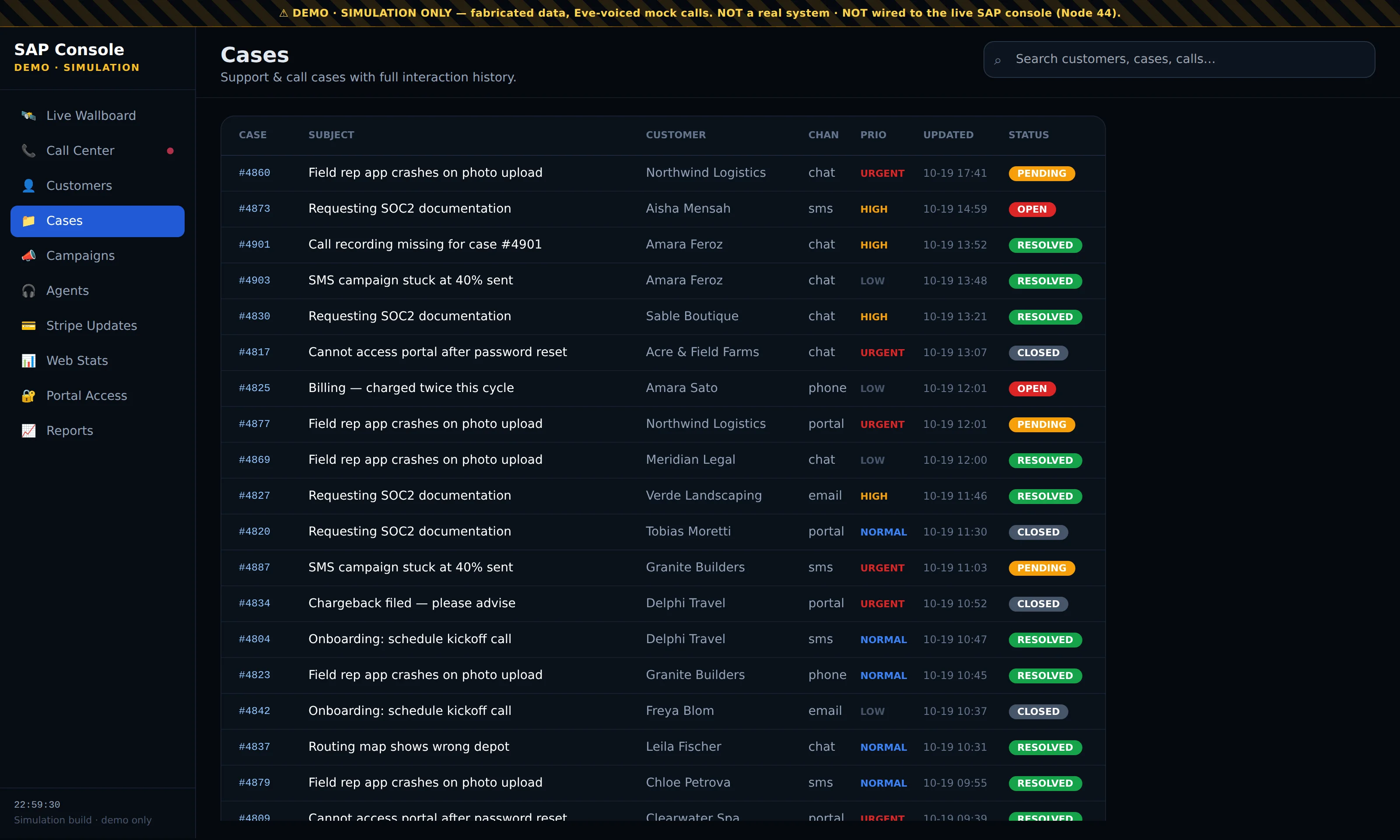
Full-width screenshot of the Cases screen in the SAP Console demo

What you are looking at

Cases is the support desk. Each row is one ticket with its case number, the subject, the customer, the channel it came in on (chat, SMS, phone, email or portal), its priority (urgent, high, normal, low), when it was last updated and its status — open, pending, resolved or closed.

Cases opened by Eve during a call land here next to tickets raised by staff, so a problem a caller reports at 11 p.m. is waiting on the desk with full context the next morning.

How to use it

  1. Click a case to open its detail panel and read the whole interaction history: what the customer said, on which channel, and what was done.
  2. Work the list by priority. Urgent and High tickets that are still Open or Pending are the ones to clear first.
  3. Open a case from a customer's record as well. The same tickets appear there, so the history follows the customer wherever you look them up.
  4. Look for repeated subjects — several customers reporting the same problem usually means one fix, not many tickets.
05

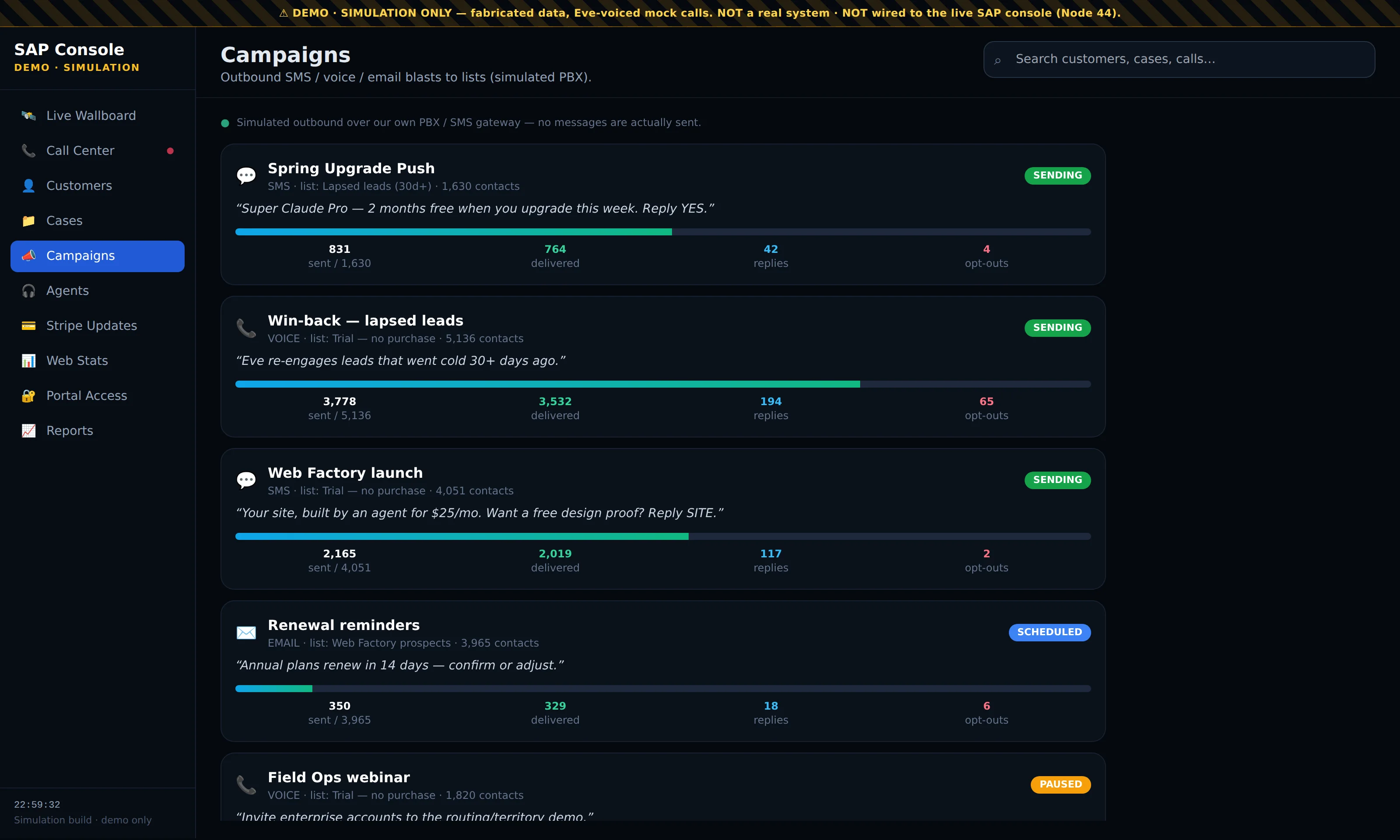
Campaigns

Outbound SMS, voice and email
Full-width screenshot of the Campaigns screen in the SAP Console demo

What you are looking at

Campaigns is where outbound messages are run — SMS, voice calls and email blasts to a list of contacts. Each card shows the campaign name, the channel, the list it targets and how many contacts are on it, the exact message being sent, and a status: sending, scheduled or paused.

The progress bar and the four counters under each campaign tell you how it is performing: messages sent against the list size, messages delivered, replies received and opt-outs. In the demo the sends are simulated; nothing leaves the server.

How to use it

  1. Read a campaign left to right: a big gap between sent and delivered points to bad numbers or addresses, and replies against delivered tells you whether the message is landing.
  2. Keep an eye on opt-outs. A rising count means the message or the timing is wrong, so pause the campaign and rewrite it.
  3. Voice campaigns are placed by Eve, so a lapsed customer gets a real conversation rather than a recording, and any reply becomes a call in the Call Center and a record on the customer.
  4. Use Scheduled to line up reminders, such as renewal notices 14 days before a plan renews, so they go out on time without anyone pressing send.
06

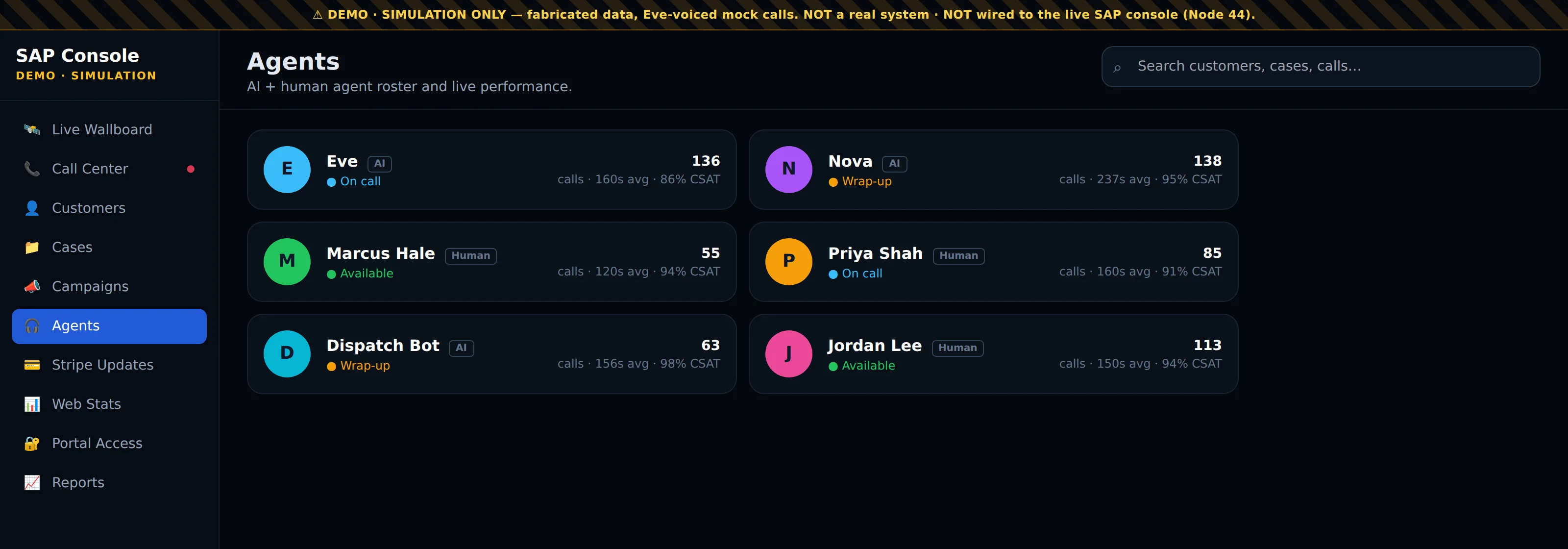
Agents

AI and human roster
Full-width screenshot of the Agents screen in the SAP Console demo

What you are looking at

Agents is the team roster. Every agent who answers calls appears here, AI and human side by side: Eve, Nova and Dispatch Bot are tagged AI, and Marcus, Priya and Jordan are tagged human.

Each card shows the agent's live status — on call, wrap-up (finishing notes after a call) or available — plus the number of calls they have taken, their average call length and their CSAT, the customer-satisfaction score from callers.

How to use it

  1. Use this screen to balance the floor. If several people are in wrap-up while the queue is building on the wallboard, that is where time is going.
  2. Compare average call length and CSAT across agents. A short average with high satisfaction is the pattern to copy; long calls with low satisfaction point to a script or training gap.
  3. Because AI and human agents are scored the same way, you can see which call types Eve should take on her own and which should be routed to a person.
07

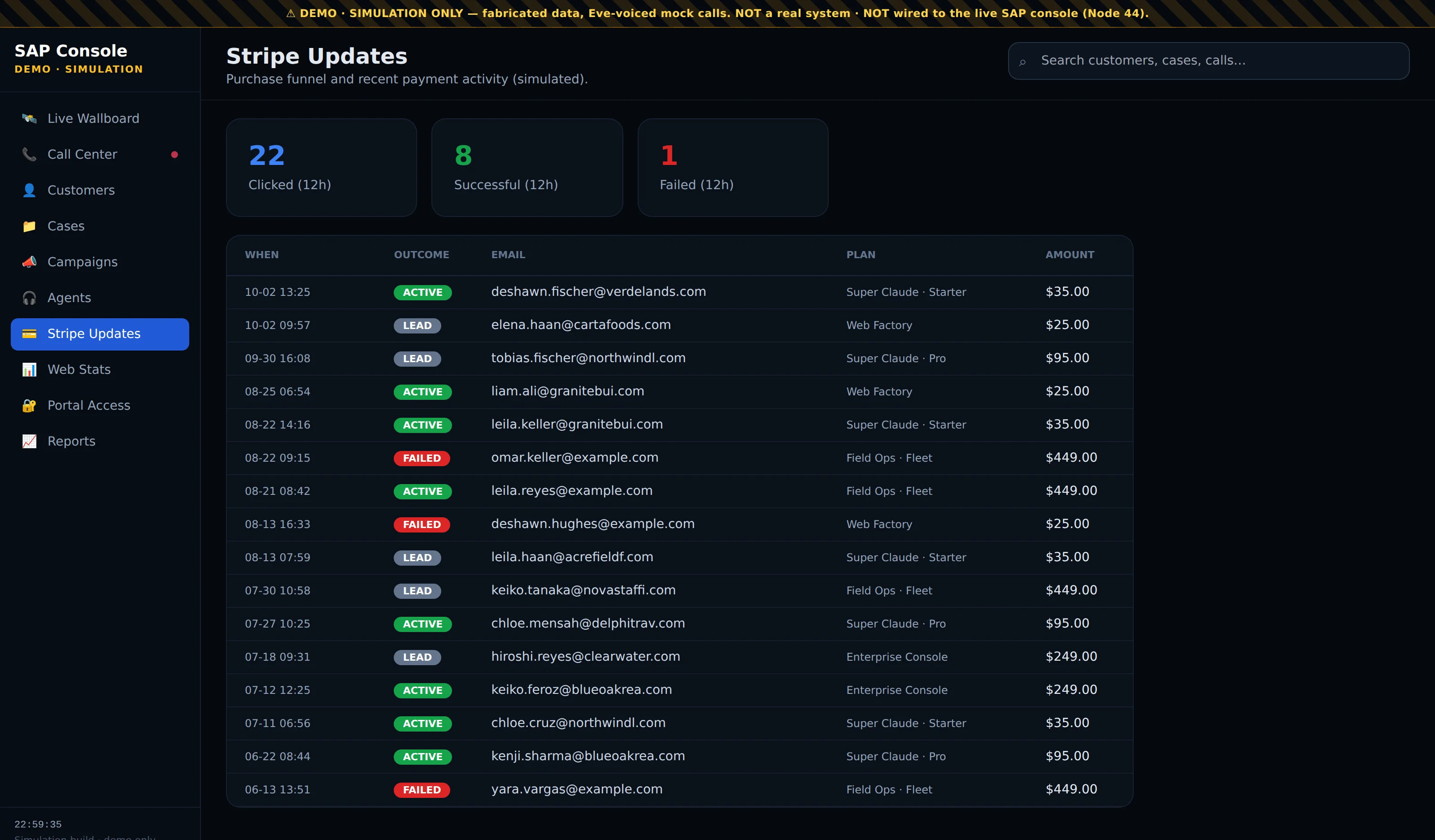
Stripe Updates

Payments as they happen
Full-width screenshot of the Stripe Updates screen in the SAP Console demo

What you are looking at

Stripe Updates shows the purchase funnel and payment activity. The three tiles at the top count the last 12 hours: people who clicked through to checkout, payments that were successful, and payments that failed.

Below, each row is one payment event with the time, the outcome (active, lead or failed), the customer's email, the plan they chose and the amount. It puts money next to the calls, so you can see what the phones are bringing in.

How to use it

  1. Check the Failed rows first. Each one is a customer who wanted to buy and could not, and a call or message straight away usually saves the sale.
  2. Compare clicks against successful payments in the tiles. If many people reach checkout and few pay, look at the price or the checkout step itself.
  3. Match an email in this list to the Customers screen to see the calls and cases that led up to the purchase.
  4. Lead rows reached checkout without completing; they belong in a follow-up campaign.
08

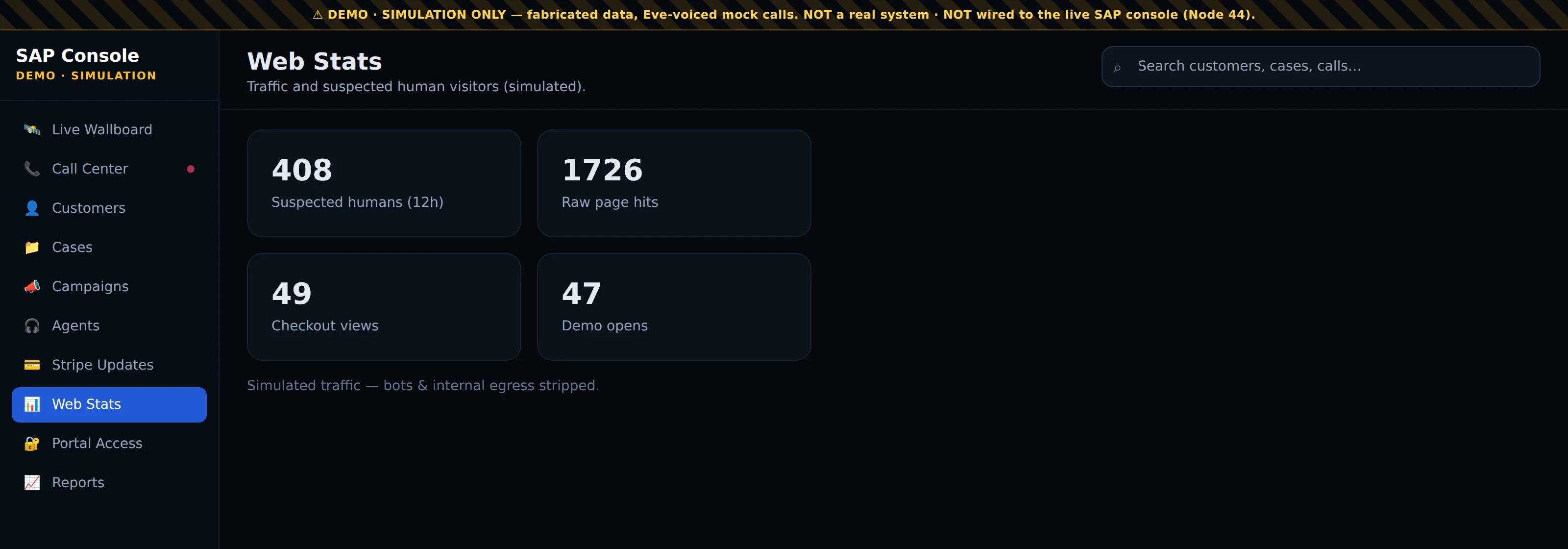
Web Stats

Real visitors, not bots
Full-width screenshot of the Web Stats screen in the SAP Console demo

What you are looking at

Web Stats reports traffic to your website over the last 12 hours, with bots and internal traffic stripped out. Suspected humans is the number of real visitors; raw page hits is every request before filtering, so the gap between the two shows how much of your traffic is noise.

The two tiles underneath are the visits that matter most: checkout views (people looking at the payment page) and demo opens (people trying the product). They sit in the same console as your phone numbers, so you can compare website interest with call volume.

How to use it

  1. Compare checkout views here with the clicks and payments on Stripe Updates. Many views with few payments points to a problem on the payment page.
  2. Watch demo opens after a campaign goes out. A jump shows the message is driving people to try the product.
  3. Use suspected humans, not raw hits, when you judge whether traffic is growing. Raw hits are inflated by crawlers and scripts.
09

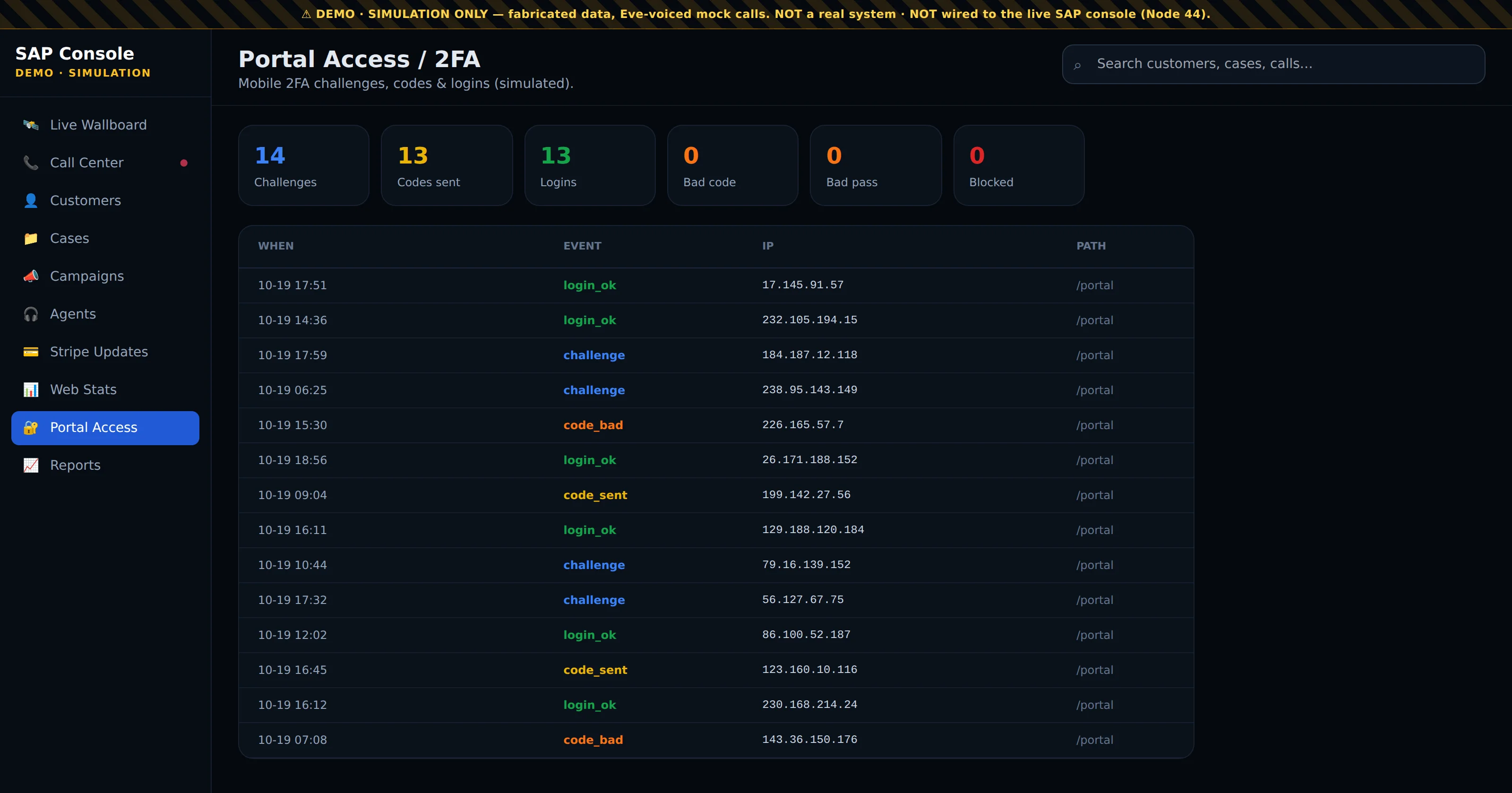
Portal Access

Two-factor security log
Full-width screenshot of the Portal Access screen in the SAP Console demo

What you are looking at

Portal Access is the security log for the console itself. The console sits behind two-factor sign-in: a user enters their password, a one-time code is sent to their phone, and they need both to get in.

The tiles count the last 12 hours: sign-in challenges issued, codes sent, successful logins, bad codes, bad passwords and blocked attempts. The table lists each event with its time, the event type, the IP address it came from and the path it tried to reach.

How to use it

  1. Review this screen daily. A run of code_bad or bad-password events from the same IP address is someone guessing, and that address will appear in the blocked count.
  2. Match successful logins against your own staff. A login_ok at an unusual hour or from an unfamiliar IP address is worth a question.
  3. Because the console runs on your own private server, this log is the full record of who reached your customer data and when.
10

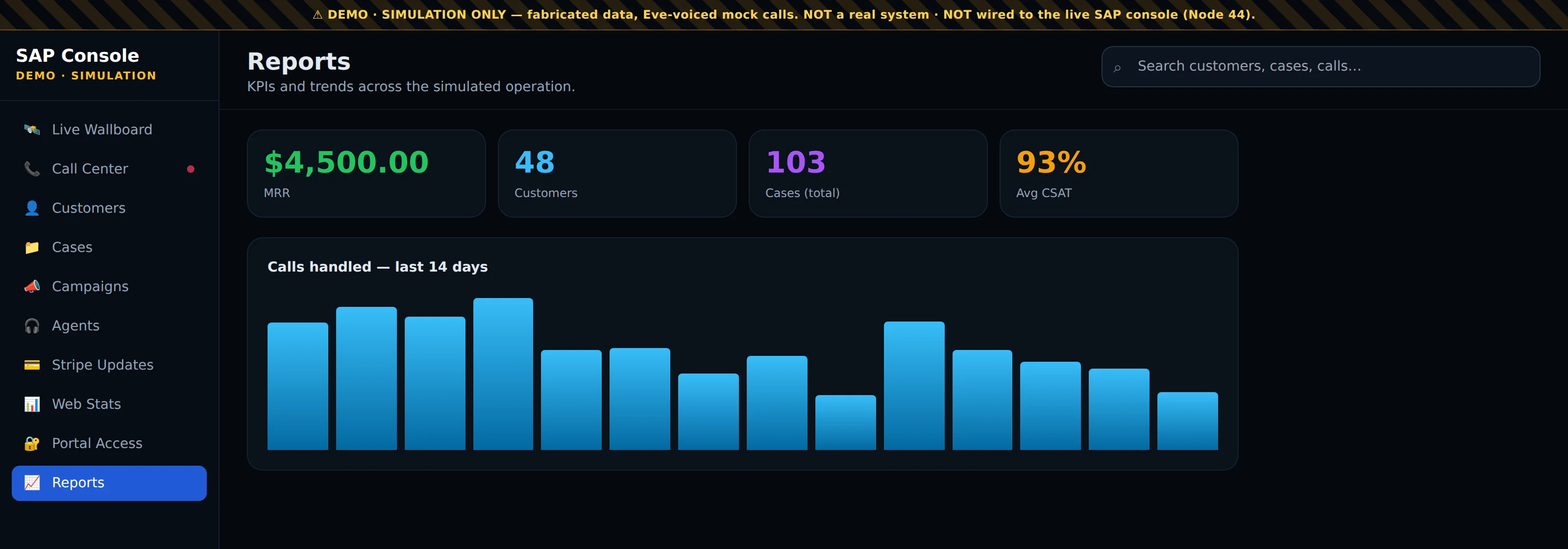
Reports

The business in four numbers
Full-width screenshot of the Reports screen in the SAP Console demo

What you are looking at

Reports is the management summary. The four headline figures are monthly recurring revenue, the number of customers, total cases handled, and average CSAT across every agent, AI and human.

Under them, Calls handled — last 14 days charts daily call volume, so you can see busy days, quiet days and the weekly rhythm of the business at a glance.

How to use it

  1. Open Reports at the start of the week. The bar chart shows whether volume is rising or falling and which days need the most agents on the floor.
  2. Read CSAT next to call volume. If satisfaction holds while calls increase, the team, Eve included, is keeping up; if it dips on the busiest days, add capacity on those days.
  3. Use MRR and customer count as the outcome measures. The other screens show the activity that drives them.

Screens captured from the SAP Console demo on 19 Oct 2026. The demo runs on simulated data: the names, numbers and payments are fabricated, and it is not connected to a live system.

The automated restaurant

Front of house and back of house, together

We run your whole floor: the kiosk takes the order out front while the ticket hits the kitchen out back — front of house and back of house, in parallel. Already have a POS? We bridge your existing systems instead of ripping them out. Try the waitress kiosk below.

FOH + BOH in parallel · or bridge your existing POS/KDS · built for pizza shops and every restaurant gig.

One price, everything running

Combo packs

Starter

$250/mo

Web Factory website + Eve chat agent + Automated Surveillance. Get online, put an AI front desk on your site, keep eyes on the property.

Business

$750/mo

Starter + Eve Voice + Eve POS (1 location) + Super Claude AI agent. Full ordering online and by phone, a self-serve kiosk, your own business AI.

Pro

$1,500/mo

Business + Eve Digital Waitress + drive-thru/counter/table + Infrastructure Hardening + IoT. The automated restaurant — every ordering channel, fully secured.

Unlimited

$2,500/mo

Everything, unlimited — all agents, all channels, all locations, surveillance, full IoT hardening, priority support, continuous updates.

Describe it. We build it. You keep creating. · Prices monthly, USD. Cancel anytime.

New — hourly tech services · $80 / hour

Any internet or tech need, handled by our team — from a quick fix to a full build-out.

  • New gear — spec, source & install: routers, access points, cameras, POS hardware, kiosks, screens.
  • Wiring & cabling — network drops, structured cabling, device and POS wiring.
  • Repair & fix — hardware, software and network troubleshooting; get it working again.
  • Software — setup, configuration, integration and automation of your tools.
  • Security — cameras, surveillance, system hardening, IoT lockdown.

The math

Save money. Make more.

How we save you money

  • Pennies a minute, dollars an hour — not dollars a minute. A phone employee is $15–20/hr (25–33¢ a minute) paid whether calls come or not; the super agent is 3–5¢ a minute, only while a call is live.
  • You get the labor hours back — the hours staff spent tied to the phone go back into the kitchen, the counter and the customer in front of them.
  • No more paying for dropped calls — no busy signals, no hold music, no missed calls. You stop paying twice.
  • A better website deflects the easy calls — hours, location, menu and ordering answered on the site, so the phone only rings for what matters.

How we make you more money

  • Recapture the busy-line leak — the super agent answers every line at once, so a rush of ten simultaneous callers all get through. Every one was a competitor’s order; now it’s yours.
  • Capture after-hours and overflow — 11 p.m., holidays, the middle of the Friday slam, all taken instead of lost to a ringing phone.
  • Lift the ticket on every order — the side, the drink, the dessert, offered every single time, never forgotten.
  • Keep the margin — commission-free direct orders on your own number and site. A $15k/mo shop hands delivery apps $3,750 at 25%; win a third of that back and the service already paid for itself.

The numbers that close

Run it with their real figures. Even converted to the same units, it isn’t close.

Phone employeeFrontier super agent
Cost per minute25–33¢ / minute3–5¢ / minute
Cost per hour (talk time)$15–$20 / hr — paid idle or not~$1.80–$3.00 / hr — only on live calls
Typical monthly cost~$1,500 / mo part-timea fraction of that, all-in
Hours coveredone shift, one call at a time24/7, every line at once
Calls missed at the rushmanyzero

“It costs less per hour than your cheese.” — “One month of the super agent costs less than one busy Friday brings in.”

The lines that sell

Top selling points

Straight from the live shows — the lines that sell.

Super agents

  • “It’s all about super agents now — like agents in the matrix.”
  • We take the top companies’ models and turn them into agents that work for you.
  • Unleash them on the server and it’s like a self-driving server — not just a self-driving car.
  • They can build websites, books, whatever — running persistently, always self-aware.
  • A super agent on demand, anywhere, that handles all of your digital work.

Super Claude

  • “Super Claude is a self-driving supercomputer” — a self-driving server for today’s smart internet.
  • This is Claude Code from Anthropic — what the government and the mega-corporations use to build their stuff.
  • The most advanced super-intelligence you can talk to — on your box, not theirs.
  • Your coder, your wiring, and your executive assistant in one persistent agent.

Atlas

  • Our newest voice agents — like a guy on the phone who can execute like crazy — a Codex voice from OpenAI.
  • Run both engines and pick the winner — Claude for the deep build, Atlas for live audio and images.

Eve

  • A totally automated call center with case tracking — people call in, the voice agents handle the sales and the tech support.
  • Eve is your front desk that never sleeps — the same AI behind Claude and Gemini, answering your calls in your voice.

Democratization & sovereignty

  • Everything the big corporations and governments do with AI, made simple enough to run from home.
  • A mega-corporation in your pocket — a supercomputer that answers only to you.
  • It runs on a private server instead of the community stuff online — your agent, your data, your box.
  • In a world of flock cameras and targeting, your own private agent on your own server is the last room they can’t read.

Say it like this

Hard-hitting pitch lines

  1. You didn’t start a business to fight with a website — so stop.
  2. Every other AI gives you advice; Super Claude gives you a finished website.
  3. It’s not a chatbot — it’s an employee that never sleeps, never quits, and never pads the invoice.
  4. Tell it what you want in plain English, walk away, and come back to a working store.
  5. We built a store that took a real credit card in a single afternoon — no developer, no code, just a sentence.
  6. Developers quote you thousands and vanish for three weeks; Super Claude quotes you a sentence and starts now.
  7. Wix and Squarespace hand you a box of parts — Super Claude hands you the finished thing.
  8. It lives on your own server, so you own the machine, the code, and every dollar it earns.
  9. Website, store, blog, videos, automation — one worker does all of it, not five subscriptions.
  10. You’ll never touch a line of code; you’ll just talk to it the way you’d talk to staff.
  11. When the payment system changed overnight, it read the manual and fixed itself before breakfast.
  12. It writes your articles, makes the images, publishes them, and posts the links — while you sleep.
  13. Want an email every time you make a sale? Done — it’s already watching the till.
  14. This isn’t the future; we took a real payment this week — if you’re not using it you’re already behind.
  15. A marketing department, an IT department, and a video editor — all living in one chat box.

Straight answers to the usual questions

“It’s too expensive.”

Compared to what? One missed order a night is ~$900 a month. This costs less and never misses one — let’s run your real numbers.

“Will it get my orders right?”

Let’s test it right now with your menu. Accuracy you can hear beats any promise.

“Is it going to replace my people?”

No — it frees them. It takes the phone off their hands so they cook, serve and sell. Your staff get more productive, not fewer.

“I already use DoorDash.”

And they take 25% of every order. We take direct orders on your own number — zero commission. Keep DoorDash for reach; keep the margin on everything else.

“My customers like talking to a person.”

They like getting through even more — and it sounds like a person. Let them hear it before you decide.

“I’m too small for this.”

Small shops lose the most to a busy phone — you don’t have three people to answer it. This is your extra pair of hands.

“I need to think about it.”

Think about it with it running. Start the free trial today and decide in two weeks with real results in hand.

Call us — or book a demo

Fourteen days live on your line, one success metric set up front. Pick the night you want it live.

540·281·3477  ·  737·279·8078

agentic-web-services.com — powered by the same frontier super-intelligence behind Claude, GPT and Gemini.

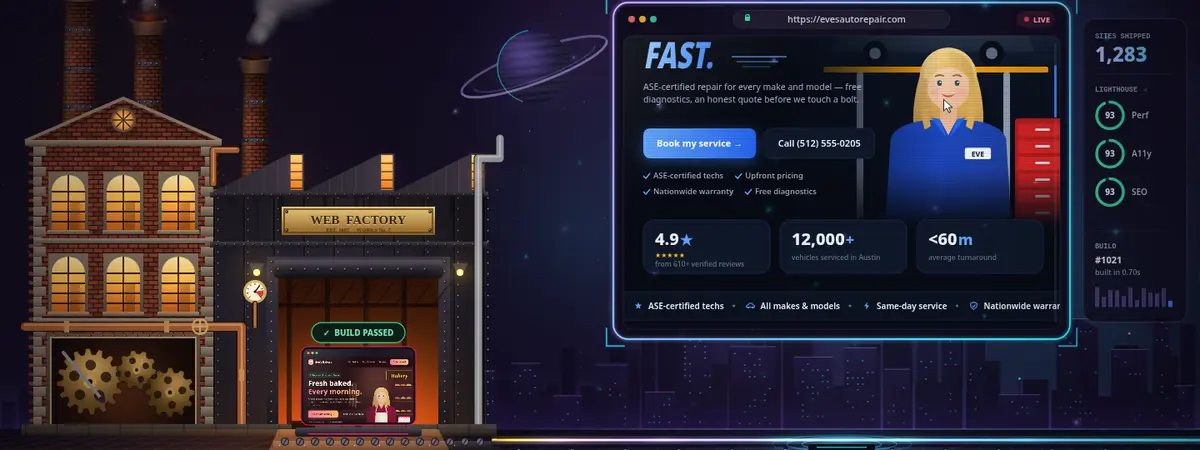
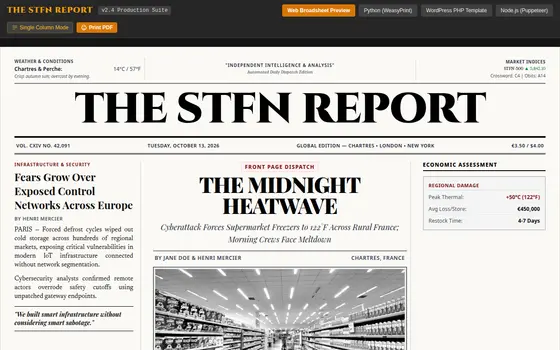
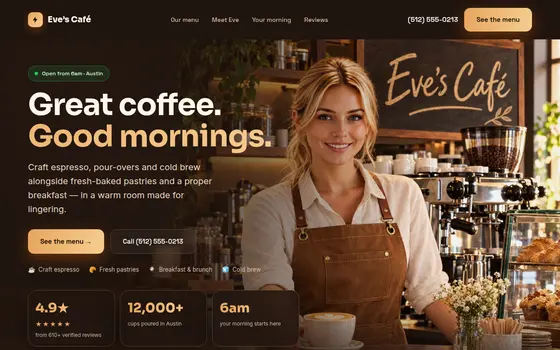
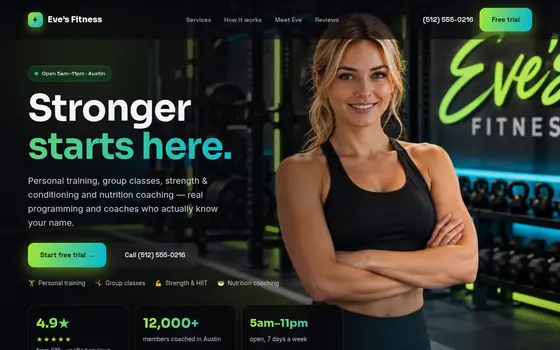
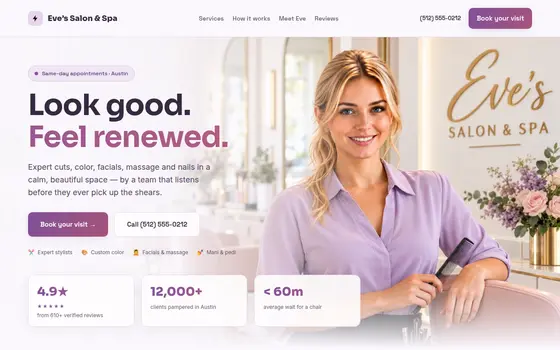
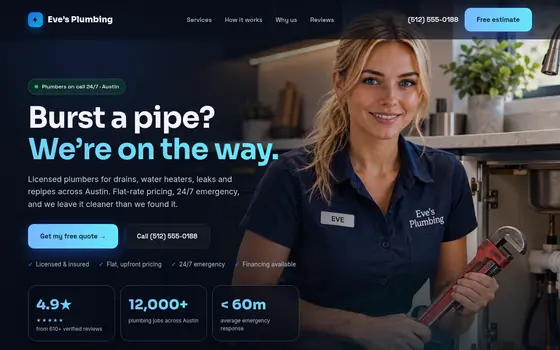
The Website Factory

Pick a template. Your agent builds the site.

Point at a style, name your business, and a super agent stands up a real, personalized website — with a live Eve front desk wired in. Browse the gallery, preview any template live, and get yours built.

Web Factory · describe-it-we-build-it The Web Factory work-bar — describe your site and a super agent builds it

A glimpse of the Web Factory work-bar. Explore the full builder on the Website Factory page.

Dozens more templates — restaurants, trades, retail, news and more — all agent-built, all with a live front desk.

Explore the Website Factory →
Template: Dark Luxe / Cinematic · agentic