Your raw material.
Recordings, voice notes, product photos, an existing site, or the idea you’ve been putting off.
OPENAI CODEX. YOUR SERVER. YOUR MISSIONS.
$35/month includes your VPS, hardening and ATLAS workspace.
Your supported ChatGPT subscription, such as Plus, is paid separately to OpenAI.
MEET YOUR NEW PRODUCTION WORKSPACE
A short introduction to the agent, the server and the missions behind your audience or business. Includes real footage from the Northstar Coffee demonstration.
See the full demonstrations ↓Synthesized narration. Actual portal footage, with waiting edited out.YOUR AUDIENCE · YOUR BUSINESS · YOUR AGENT
THE INTELLIGENCE IS HERE. GIVE IT A PLACE TO WORK.
A creator needs content. A new business needs a launch. An established business needs better systems. ATLAS gives you an AI engineer and an online computer to build the tools behind all three.
Tell it what you want in ordinary language. Codex can research, write and edit files, work with browser tools, run commands, build software and connect authorized services. ATLAS keeps the missions, conversation and deliverables together.
Agentic Web Services handles the server and workspace setup. You direct the work, inspect the result and decide what happens next.
WHERE DO YOU WANT TO GO?
Pick the mission closest to yours. This is how a useful conversation starts.
Bring your recordings, expertise and ideas. Develop a branded home for your audience and a repeatable workflow for clips, captions and campaigns.
A PROMPT YOU CAN START WITH
Help me build my personal brand: a website, a content plan and a repeatable clips-and-captions workflow from my recordings.Talk about this mission ↗
Example missions, scoped around your material and tools. Publishing connections, paid generation services and extra compute are configured as needed.
YOUR WEB & CONTENT FACTORY
Give your best ideas more mileage. Build a production workflow around the material you already have.
Recordings, voice notes, product photos, an existing site, or the idea you’ve been putting off.
ATLAS configures scripts, media tools and authorized services to process, draft and assemble.
Clips, captions, web pages and campaign drafts. Review them, refine them, then publish through approved connections.
Recording → clip workflow → captions → episode page → social drafts
Product brief → landing page → campaign assets → inquiry workflow
Existing process → custom tool → scheduled job → useful report
Your output and production volume depend on the configured tools, server resources and provider limits. You guide the brand and approve the work.
CO-WORK WITH YOUR AGENT
A live conversation can become the next instruction.
Use live voice in your ATLAS workspace to discuss the plan, ask questions and coordinate work with the Codex session. Keep the conversation going while you review files and guide the mission.
Prefer typing? Use the same dock to send a brief, drop a document or paste a screenshot. Your projects and results stay within reach.
Explore mission control ↓Voice compatibility is checked for your supported account and browser during setup.“Let’s build the launch page first.
Then help me plan the campaign.”
BUILT FOR THE WHOLE MISSION
A serious project takes more than a single answer. Codex can work through a sequence of steps, use tools, check the outcome and repair problems. ATLAS gives that work a persistent home.
Read the material, research the question and turn the goal into a plan.
Create the files, write the code and use the configured tools.
Run appropriate tests, inspect errors and work through the fixes.
Save the result, record the status and keep the project ready for its next chapter.
Your server, project files and mission summaries stay in place between visits. The agent has a working environment to return to, and you have a record of what was built.
YOUR MISSION CONTROL
Direct the agent, inspect the execution and keep the results organized. Open ATLAS from your phone or computer and return to the project you’re building.
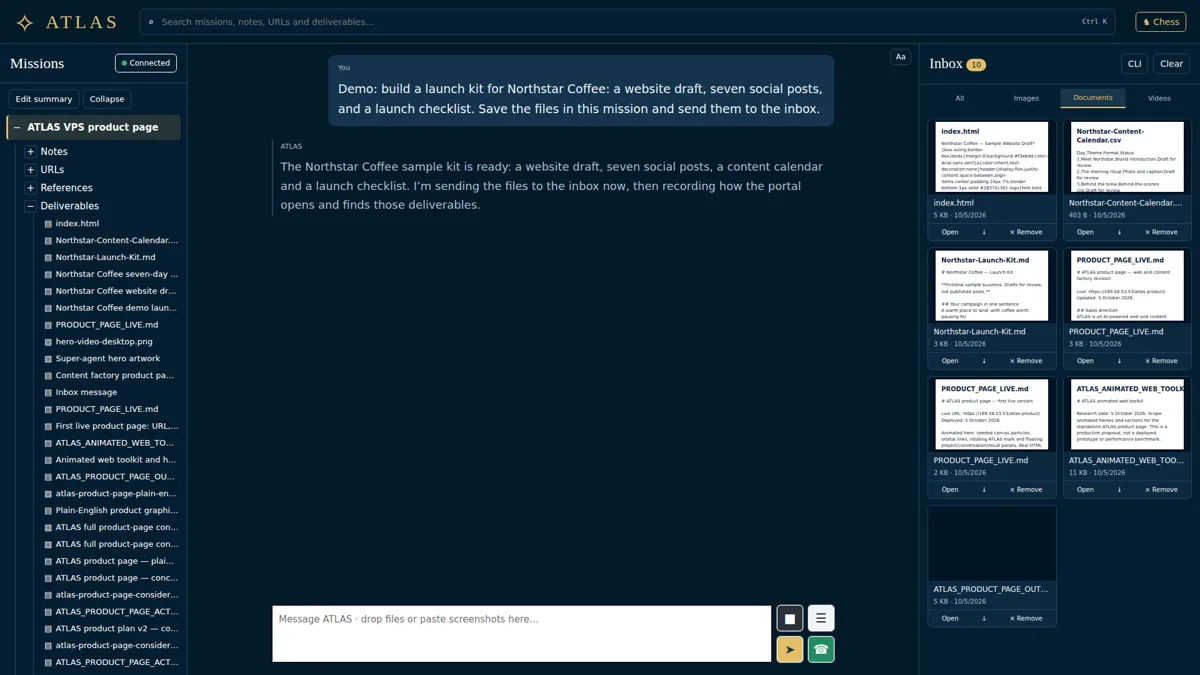
Notes, links, project assets and summaries in one tree.
Preview images, documents and videos alongside the conversation.
Show the live terminal beside chat when you want a closer look.
Try it live · closed-loop demo
This is the real v2 workspace interface, running a scripted agent in your browser. Ask in the chat, or switch to CLI and type help, ledger or atlas "build my site". Nothing you type leaves this page.
Demo workspace: scripted replies and a simulated shell. Your own workspace runs the real agent on your private server.
REAL WORK. THREE WAYS TO SEE IT.
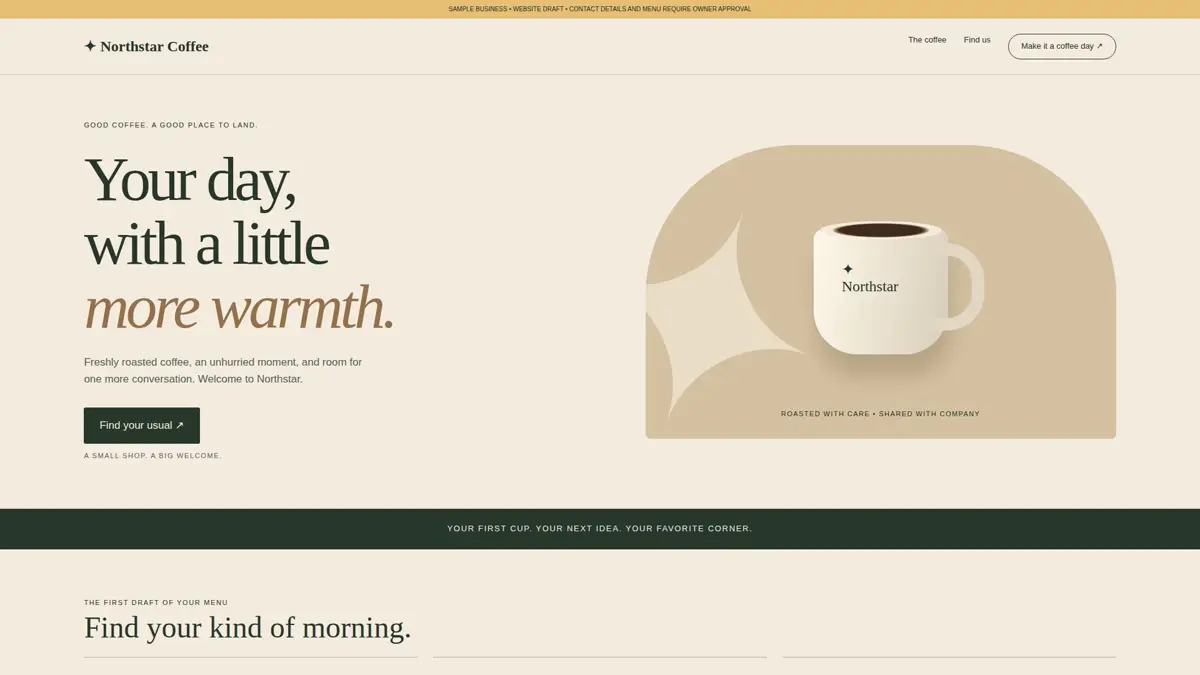
These are three edits of the same genuine portal session, not three separate customer jobs. The Northstar files below are the work it produced.
Follow one request through the dock, the resulting files and the website draft.
A product report on how source material becomes organized, reviewable outputs.
Tour the conversation, live terminal, search and full document reader.
Videos load when you press Play. Synthesized narration and captions explain the real demonstration; no customer account connections or published campaigns are implied.
A REAL REQUEST. REAL FILES.
We sent one request through the ATLAS dock. It reached the Codex session, and the website draft, seven post drafts, content calendar and launch checklist were saved and delivered through the portal.
 ATLAS · YOUR PERSISTENT AI ENGINEER
GIVE THE INTELLIGENCE A WORKSHOP
Keep the code, tools, website drafts and production files on a server workspace built around your projects. Open the browser when you want to direct the next step.
Model intelligence comes from the configured provider. Project files and installed tools live on your VPS. A healthy detached session can continue without the browser; saved notes help recover project context after a restart.
WHY THE VPS + ATLAS COMBINATION ROCKS
A VPS is your own online computer. We prepare a hardened Contabo server and install the ATLAS workspace so Codex can build and operate there.
Develop websites, apps and custom tools in the same environment that can run compatible services. The project has a place to be built, tested and deployed.
The VPS stays online independently of your personal computer. Deployed sites and configured jobs can keep running when your laptop is off.
Keep the project environment separate from the everyday files and software on your laptop. Server hardening is part of the setup.
Connect approved APIs, databases, publishing tools or external compute. Build around the way your brand or business actually works.
Codex work follows your account’s usage limits. Scheduled agent jobs and integrations need configuration; larger workloads may need an upgrade or additional services.
AN ENGINEER’S TOOLKIT. YOUR DIRECTION.
Campaign planning · research · scripts · caption drafts · media-processing workflows · animated web content
Business sites · landing pages · apps · dashboards · customer portals · booking tools
Quote tools · data processing · reports · document pipelines · configured schedules · website checks
Authorized APIs · databases · publishing platforms · email services · bots · external compute
WE HANDLE THE FOUNDATIONS
We provision the Contabo VPS, configure hardening and install the ATLAS portal and Codex environment.
Sign in with your own supported ChatGPT plan, such as Plus, purchased directly from OpenAI.
Bring the brief and source files. Agree on the work, check the configured tools and start building together.
YOUR SERVER. YOUR WORKSPACE. YOUR AGENT.
The Contabo VPS, hardening and ATLAS workspace are in the package. Your OpenAI subscription is a separate purchase.
Check supported ChatGPT plans ↗Your online workshop, ready for your missions.
A supported plan, such as Plus, is required and billed separately by OpenAI. OpenAI usage limits apply.
Domains, paid media tools, specialist APIs and additional compute are separate when your mission needs them.
GET THE PICTURE
A Contabo VPS with hardening and ATLAS setup: a browser workspace around OpenAI’s Codex agent. You bring your supported ChatGPT subscription, bought separately from OpenAI.
ATLAS can help build the assets and systems behind that goal: websites, content plans, media workflows, campaign drafts and business tools. Audience growth and business results depend on your offer, material, decisions and execution.
The ATLAS setup supports live voice coordinating with the Codex session. We check your account, browser and audio setup during onboarding. Typing, file drops and screenshot pasting remain available in the same workspace.
The server, project files and mission summaries remain between visits. Your Codex session can work through extended tasks and use saved project state to continue. That does not mean unlimited account usage or perfect memory of every conversation.
With the appropriate tools and authorized connections, ATLAS can research, edit files, run scripts, build software, process media and operate configured services. Tell us the specific job so we can confirm the tools and access it needs.
You can inspect files and the live terminal, review deliverables, and ask for appropriate checks. Technical work is tested according to the project; factual and brand-sensitive material should be reviewed before publishing.
The VPS stays online. Deployed websites, services and configured jobs can continue independently of your laptop. Agent work remains subject to your OpenAI plan, running session and configured schedule.
You can start with ordinary language. We prepare the server and workspace, and ATLAS can handle technical steps within the agreed project. You still guide the goal and review what is delivered.
Your supported ChatGPT plan is separate. Domains, paid APIs, generation tools, publishing services or extra compute may add costs. We’ll scope those, along with support, storage and cancellation terms, before provisioning.
YOUR NEXT CHAPTER STARTS WITH A MISSION
Tell us what you want to build, produce or improve. Let’s prepare the agent and server to take it on.
Talk about my ATLAS workspace ↗Contact Agentic Web Services. We’ll discuss your first mission and setup.